

Cara Install Ekstensi Chrome
- Klik tombol "Add to Chrome" di atas.
- Anda akan diarahkan ke Chrome Web Store.
- Klik "Add to Chrome" pada halaman ekstensi.
- Konfirmasi dengan klik "Add Extension" pada popup.
- Ekstensi akan otomatis terpasang dan ikon muncul di toolbar.
- Klik ikon ekstensi di toolbar untuk mulai menggunakan.
Screenshot

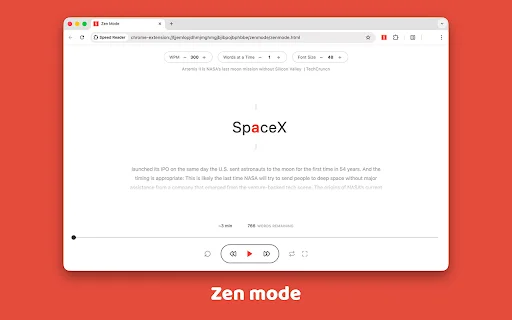
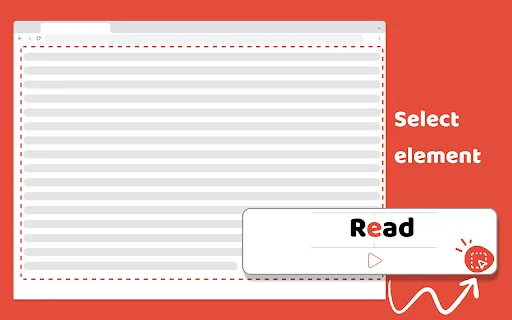
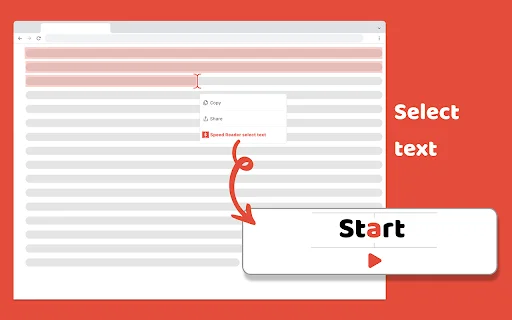
In today’s fast-paced digital world, the ability to process information quickly is a superpower. Whether you are a student tackling dense textbooks or a professional drowning in long-form reports, the Speed Reader extension is your ultimate solution to reclaim your time. By leveraging advanced Rapid Serial Visual Presentation (RSVP) technology, our tool helps you break through the 250 words-per-minute barrier, allowing you to consume content with unprecedented speed and enhanced comprehension.
Stop wasting hours on endless scrolling and repetitive reading. With Speed Reader, you can effortlessly double or even triple your reading rate, reaching 500+ words per minute with ease. This lightweight, user-friendly Chrome extension seamlessly integrates into your browsing experience, ensuring that whether you are catching up on news, researching academic papers, or reading personal blogs, you stay ahead of the curve. Experience the future of reading and supercharge your personal development today.
Key Features
- Utilizes scientifically-backed RSVP technology for maximum efficiency.
- Adjustable reading speed settings to match your personal comfort level.
- Distraction-free interface designed for deep focus and comprehension.
- Seamless integration with any website containing text content.
- Built-in progress tracking to monitor your words-per-minute improvement.
- Perfect for students, researchers, and busy professionals.
- Privacy-focused design with absolutely no invasive ads.
- Simple “Select and Play” functionality for instant results.
How to Use
- Install the Speed Reader extension from the Chrome Web Store.
- Navigate to any webpage featuring the article or document you want to read.
- Highlight the specific text block you wish to process.
- Click the extension icon in your browser toolbar to launch the reader.
- Adjust your speed settings and watch your comprehension soar.
FAQ
What is RSVP technology?
RSVP stands for Rapid Serial Visual Presentation. It displays words one by one in a fixed position, which eliminates the time your eyes spend moving across a page and allows you to process information faster.
Can I adjust the speed while reading?
Yes, you can easily increase or decrease your words per minute (WPM) settings directly within the extension interface.
Does this work on every website?
Speed Reader is designed to work on almost any website that contains standard text content.
Is there a limit to how fast I can read?
While the tool is optimized for 500+ WPM, you can set the speed to whatever level you find most comfortable and effective for comprehension.
Is my data private?
Absolutely. We prioritize your privacy and do not collect or store your reading data or personal information.
Ready to transform your reading habits? Install Speed Reader today and join thousands of users who are saving time and learning faster than ever before. Click “Add to Chrome” now and start your journey to expert-level reading!
Users highly praise the extension for its effectiveness in boosting reading speeds and helping manage large amounts of online content efficiently.
Kelebihan
- Scientifically-backed RSVP technology
- Highly effective for processing large amounts of text
- User-friendly and intuitive interface
- Significant time-saver for students and professionals
Kekurangan
- Lacks an option to adjust chunk size for word display
Ulasan Pengguna
thanks for the extension but an chunk size option (option for number of words shown at once) should be added asap.
I have needed this extension for a long time! I spend too much time reading huge posts, but with this speed reader I can focus and boost my reading speed
This extension implements an interesting idea for increasing reading speed, and I find it very successful. I think everyone who has to read large amounts of information should try this extension. Using the extension will help reduce the time spent reading in the future.
| ID Ekstensi | iifbkjcdekfokhpjbiabfgjlloabpdlp |
|---|---|
| Version | 1.5.10 |
| Size | 0.3 MB |
| Developer | https://speed-reader.pro/ |
| Terakhir Diperbarui | |
| Tanggal Rilis | |
| Jumlah Pengguna | 1.000++ |
| Jumlah Ulasan | 6 |
| Chrome Store Ranking | #29070 |
| Category | Productivity |
| Tipe | Free |
| Status | Featured Extension |

Catalogapp: QR Catalog Maker ডাউনলোড করুন – প্রফেশনাল ক্যাটালগ তৈরি করুন
Apps Century

Chronicle – AI Voice Memory ডাউনলোড করুন – সেরা AI মেমোরি অ্যাপ
Chronicle.chat

Edit Website Extension ডাউনলোড করুন – লাইভ টেক্সট এডিটর
Ashwin

Scratchpad ডাউনলোড করুন – দ্রুত নোট ও অটোসেভ এক্সটেনশন
https://mythical5th.com

PGroup Driver ডাউনলোড করুন – ড্রাইভারদের আয়ের সেরা মাধ্যম
PGROUPVN

Codex ডাউনলোড করুন – ক্রোম ব্রাউজার নিয়ন্ত্রণের সেরা টুল
OpenAI