

LingTube: Best YouTube Subtitle Translator & AI Dubbing Tool
Cara Install Ekstensi Chrome
- Klik tombol "Add to Chrome" di atas.
- Anda akan diarahkan ke Chrome Web Store.
- Klik "Add to Chrome" pada halaman ekstensi.
- Konfirmasi dengan klik "Add Extension" pada popup.
- Ekstensi akan otomatis terpasang dan ikon muncul di toolbar.
- Klik ikon ekstensi di toolbar untuk mulai menggunakan.
Screenshot
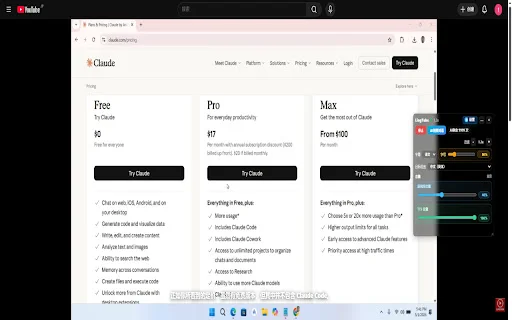
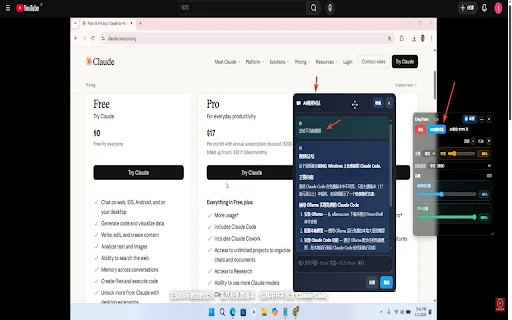
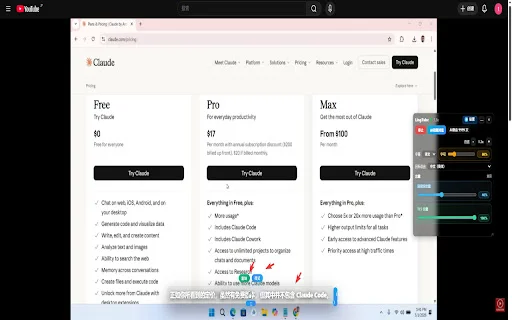
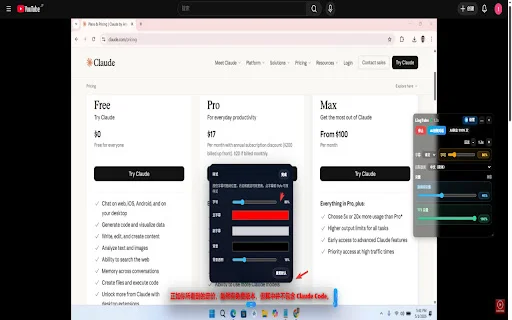
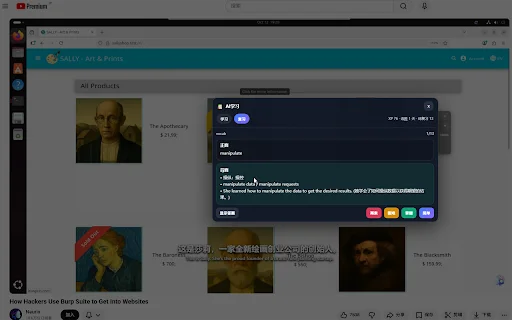
Are you tired of missing out on valuable information in foreign-language YouTube videos? Whether you are a student trying to master a new language, a developer watching technical tutorials, or a movie enthusiast following international cinema, LingTube is your ultimate browser companion. By breaking down language barriers instantly, this powerful extension transforms any YouTube video into a personalized learning experience right in your browser.
LingTube goes beyond simple translation by integrating advanced AI dubbing and real-time speech recognition. Imagine watching a documentary or a complex news report and having it narrated in your native language with a natural-sounding voice. With features like bilingual subtitles, context-aware translation, and AI-powered summarization, you can consume global content at your own pace without the constant struggle of manual subtitle reading.
Key Features
- Real-time YouTube Translation: Instantly translate subtitles or speech from any foreign-language video.
- AI Voice Dubbing: Use natural-sounding voices to read translations aloud while you watch.
- No-Caption Support: Automatically convert speech to text for videos that lack built-in subtitles.
- Bilingual Captions: Display original and translated text simultaneously for effective language learning.
- AI Video Summarizer: Quickly extract key points, technical terms, and timestamps from long videos.
- Audio Mixing: Adjust volume levels between the original video audio and the AI-generated voice.
- Enhanced Learning Tools: Generate vocabulary lists, grammar exercises, and review content based on video dialogue.
- Customizable Experience: Use hotkeys for seamless control and save your preferences locally for privacy.
How to Use
- Install the LingTube extension from the Chrome Web Store or your browser’s add-on manager.
- Open any YouTube video you wish to watch and click the LingTube icon in your toolbar.
- Select your preferred source and target languages to start generating subtitles and voice dubbing instantly.
- Use the Alt+Shift+V hotkey to quickly toggle translation and narration on or off as needed.
FAQ
Is LingTube free to use?
Yes, LingTube provides essential translation features for free, making it accessible for all users.
Does it work on videos without existing subtitles?
Absolutely! LingTube uses advanced speech recognition to transcribe and translate videos even if they have no captions.
Can I hear the translation and the original audio at the same time?
Yes, the audio mixing feature allows you to play both simultaneously with independent volume controls.
Is my data private when using this extension?
Yes, LingTube runs locally on YouTube pages and only sends data to the translation or AI services you explicitly enable.
Can LingTube help me learn a new language?
Yes, with bilingual subtitles and AI-generated vocabulary and grammar exercises, it is a perfect tool for language learners.
Don’t let language barriers stop you from accessing the world’s knowledge. Install LingTube today to experience seamless translation, AI dubbing, and efficient video summarization. Transform your YouTube viewing experience now!
Users highly appreciate LingTube for its speed, ease of use, and the fact that it requires no registration to start watching foreign content.
Kelebihan
- Fast response time
- No registration required
- Easy to install and use
- Great for technical tutorials and movies
Ulasan Pengguna
Awesome! It responds super fast, and the best part is that there's no registration required... Thank you so much to the author!
It is really easy to use, and the fact that it works without any registration or complex installation is just great.
It is incredibly convenient for watching technical tutorials, and the fact that I can even use it for movies is really excellent!
| ID Ekstensi | jjhplddhmkfngobhompljgnhbhkgilbi |
|---|---|
| Version | 1.1.8 |
| Size | 1.3 MB |
| Developer | https://lingtube.xyz |
| Terakhir Diperbarui | |
| Tanggal Rilis | |
| Jumlah Pengguna | 1.000++ |
| Jumlah Ulasan | 27 |
| Chrome Store Ranking | #25448 |
| Category | Education |
| Tipe | Free |

Korean Bites ডাউনলোড করুন – কোরিয়ান ভাষা শিখুন সহজ নিয়মে
hongdev

EduMall App ডাউনলোড করুন – সেরা অনলাইন পরীক্ষার প্রস্তুতি অ্যাপ
appx.co.in

শেখ মুহাম্মদ সিদ্দিক আল-মিনশাওয়ি কুরআন অডিও ডাউনলোড – সম্পূর্ণ কুরআন
NancyApp

Gurukul Prabodhini Pune ডাউনলোড করুন – সেরা শিক্ষা প্ল্যাটফর্ম
Dnyaneshwar Ramchandra Patil

Leader – Leadership Skills ডাউনলোড করুন – নেতৃত্বের অভ্যাস ও দক্ষতা বাড়ান
Leadership Labs

Chhattisgarh Jobs অ্যাপ ডাউনলোড করুন – নতুন চাকরির আপডেট
Blessweb Solution